Selenium Grid (Architecture)

Let us now understand the architecture of Selenium Grid in this post, before you set up Selenium Grid 4 for your tests.
The architecture of Selenium Grid 4 is designed to be more flexible and scalable than previous versions, with a focus on reducing latency and improving performance.
Some of the key features of Selenium Grid 4 architecture are:
- Hub and Node: Selenium Grid 4 has a hub and node architecture, where the hub acts as the central point of control for the tests, and the nodes are the machines where the tests are executed.
- Distributed Execution: Selenium Grid 4 supports distributed execution of tests, which means that tests can be run on multiple machines in parallel, allowing for faster test execution and reduced test times.
- Flexible Configuration: Selenium Grid 4 allows for more flexible configuration of tests, with the ability to define custom capabilities and options for each node, allowing for more fine-grained control over the test environment.
- Better Performance: Selenium Grid 4 has been designed with performance in mind, with improvements to reduce latency and improve test execution times.
- Support for Docker: Selenium Grid 4 has built-in support for Docker, allowing for easy deployment and scaling of the test environment.
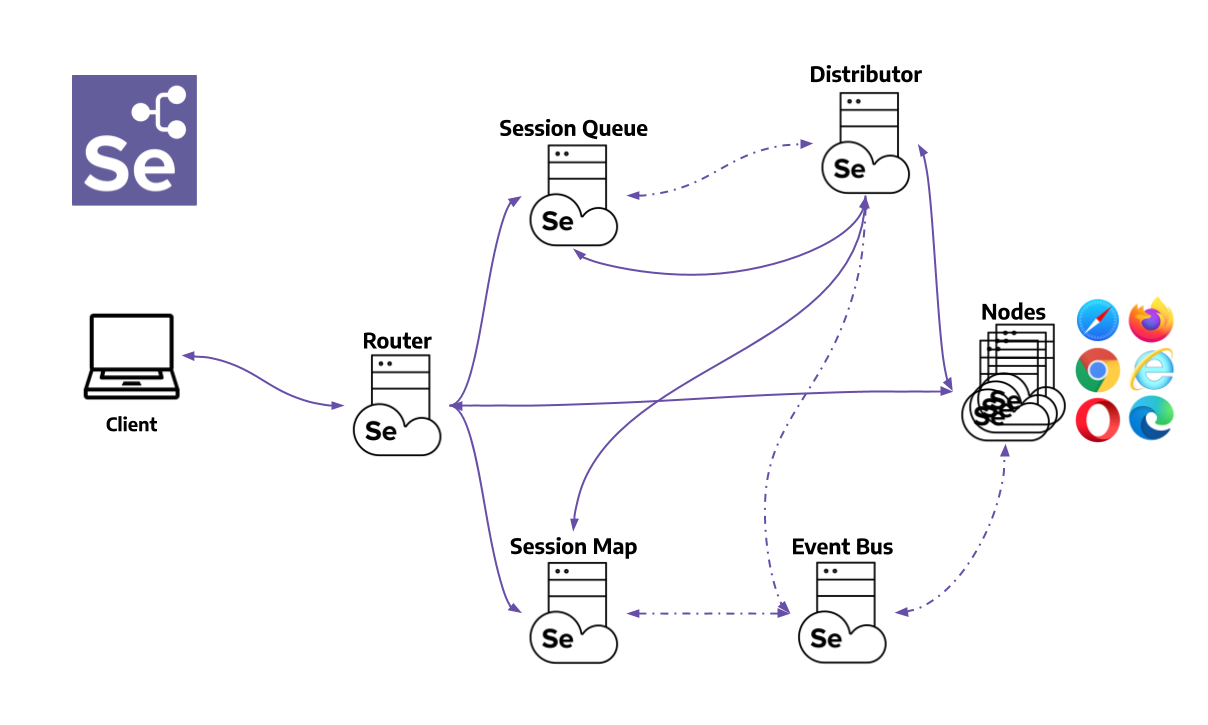
Overall, the architecture of Selenium Grid 4 is designed to be more flexible, scalable, and performant than previous versions, making it a great choice for running Selenium tests at scale.
💡
Let us now understand how to set up Selenium Grid 4 in our next post
Setting Up Selenium Grid
In this post, we’ll walk you through step-by-step on how to set up Selenium Grid 4, so you can start running your Selenium tests faster and more efficiently. So, let’s get started! To get started with Selenium Grid 4, the first step is to download the latest version of Selenium
